Firewall Security Company India Complete Firewall Security Solutions Provider Company in India
Fortinet Technical Support Number India
Support: +91 94 8585 7788
Submit Support Ticket
Fortigate Firewall Manual Documentation
| Table Content | Page Number |
| Getting started | 10 |
| Installing a FortiGate in NAT mode | 10 |
| Connecting network devices | 10 |
| Configuring interfaces | 11 |
| Adding a default route | 12 |
| Selecting DNS servers (optional) | 13 |
| Creating a policy | 13 |
| Results | 14 |
| Fortinet Security Fabric installation | 16 |
| Configuring Edge | 17 |
| Installing Accounting and Marketing | 22 |
| Installing Sales | 27 |
| Configuring the FortiAnalyzer | 32 |
| Adding security profiles (optional) | 35 |
| Results | 36 |
| VDOM configuration | 38 |
| Enabling and creating VDOMs | 39 |
| Configuring a management interface | 39 |
| Assigning interfaces | 40 |
| Creating per-VDOM administrators | 42 |
| Configuring the VDOMs | 43 |
| Configuring global security profiles | 44 |
| Results | 45 |
| FortiGate registration and basic settings | 47 |
| Registering your FortiGate | 47 |
| Setting system time | 50 |
| Creating administrators | 50 |
| Using a trusted host (optional) | 52 |
| Results | 53 |
| Verifying FortiGuard licenses and troubleshooting | 54 |
| Viewing your licenses | 54 |
| Troubleshooting | 56 |
| Results | 58 |
| Logging FortiGate traffic and using FortiView | 60 |
| Configuring log settings | 60 |
| Enabling logging | 61 |
| Results | 61 |
| Creating security policies for different users | 64 |
| Creating the Employee user and policy | 65 |
| Creating the Accounting user and policy | 67 |
| Creating the Admin user, device, and policy | 68 |
| Ordering the policy table | 70 |
| Results | 71 |
| Upgrading FortiGate firmware | 72 |
| Checking the current FortiOS firmware | 73 |
| Upgrading to the latest version | 73 |
| Results | 75 |
| Tags in the Fortinet Security Fabric | 76 |
| Creating tag categories and tags | 76 |
| Applying tags | 78 |
| Results | 80 |
| Port forwarding | 82 |
| Creating virtual IP addresses | 82 |
| Creating a virtual IP group | 85 |
| Creating a security policy | 86 |
| Results | 87 |
| Security Rating | 90 |
| Checking the Security Rating widget | 91 |
| Checking your Security Rating | 91 |
| Results | 93 |
| Automation stitches | 95 |
| Creating the Automation stitches | 96 |
| Testing the Automation stitches | 97 |
| Results | 99 |
| FortiSandbox in the Fortinet Security Fabric | 100 |
| Checking your Security Rating | 101 |
| Connecting the FortiSandbox | 101 |
| Allowing VM Internet access | 103 |
| Adding FortiSandbox to the Security Fabric | 104 |
| Adding sandbox inspection to security profiles | 106 |
| Results | 109 |
| FortiManager in the Fortinet Security Fabric | 111 |
| Connecting the FortiManager | 111 |
| Allowing Internet access | 112 |
| Configuring central management | 113 |
| Results | 115 |
| Redundant Internet with SD-WAN | 116 |
| Blocking malicious domains using threat feeds | 119 |
| Authentication | 121 |
| Agent-based FSSO for Windows AD | 121 |
| Installing the FSSO agent | 121 |
| Configuring the FSSO agent | 125 |
| Setting up your FortiGate for FSSO | 125 |
| Results | 128 |
| FSSO in polling mode for Windows AD | 129 |
| Creating a Fabric Connector | 129 |
| Creating a user group | 130 |
| Creating a policy | 131 |
| Results | 131 |
| High availability | 132 |
| High availability with two FortiGates | 132 |
| Setting up registration and licensing | 133 |
| Configuring the primary FortiGate for HA | 133 |
| Connecting the backup FortiGate | 134 |
| Configuring the backup FortiGate | 135 |
| Viewing the status of the HA cluster | 136 |
| Results | 138 |
| (Optional) Upgrading the firmware for the HA cluster | 139 |
| High Availability with FGCP (expert) | 140 |
| Configuring the primary FortiGate | 141 |
| Configuring the backup FortiGate | 144 |
| Connecting the primary and backup FortiGates | 145 |
| Checking cluster operation | 145 |
| Disabling override (recommended) | 146 |
| Results | 147 |
| Adding a third FortiGate to an FGCP cluster (expert) | 148 |
| Enabling override on the primary FortiGate (optional) | 149 |
| Configuring the new FortiGate | 149 |
| Connecting the new FortiGate to the cluster | 150 |
| Checking cluster operation | 151 |
| Disabling override (recommended) | 152 |
| Converting to an active-active cluster | 152 |
| Results | 153 |
| FGCP Virtual Clustering with two FortiGates (expert) | 154 |
| Preparing the FortiGates | 155 |
| Configuring clustering | 156 |
| Connecting and verifying cluster operation | 158 |
| Adding VDOMs and setting up virtual clustering | 159 |
| Checking virtual cluster operation | 160 |
| Results | 162 |
| FGCP Virtual Clustering with four FortiGates (expert) | 164 |
| Preparing the FortiGates | 165 |
| Configuring clustering | 166 |
| Connecting and verifying cluster operation | 168 |
| Adding VDOMs and setting up virtual clustering | 169 |
| Checking virtual cluster operation | 171 |
| Results | 173 |
| SD-WAN with FGCP HA (expert) | 176 |
| Connecting the FortiGate to your ISPs | 177 |
| Removing existing configuration references to interfaces | 177 |
| Creating the SD-WAN interface | 177 |
| Configuring SD-WAN load balancing | 178 |
| Creating a static route for the SD-WAN interface | 179 |
| Configuring a security policy for SD-WAN | 180 |
| Configuring the FortiGate for HA | 180 |
| Configuring the backup FortiGate | 182 |
| Connecting the primary and backup FortiGates | 183 |
| Checking cluster operation | 184 |
| Disabling override (recommended) | 185 |
| Results | 185 |
| Testing HA failover | 186 |
| Testing ISP failover | 186 |
| Security profiles | 188 |
| Blocking Facebook while allowing Workplace by Facebook | 188 |
| Creating a web filter profile | 188 |
| Applying the security profiles | 190 |
| Results | 191 |
| Antivirus scanning using flow-based inspection | 192 |
| Verifying the inspection mode | 192 |
| Configuring the AntiVirus profile | 193 |
| Enabling antivirus in a policy | 193 |
| Results | 194 |
| FortiSandbox in the Fortinet Security Fabric | 195 |
| Checking the Security Rating | 196 |
| Connecting the FortiSandbox and Edge | 196 |
| Allowing VM Internet access | 199 |
| Adding the FortiSandbox to the Security Fabric | 200 |
| Adding sandbox inspection to security profiles | 202 |
| Results | 205 |
| DNS Filtering | 207 |
| Creating a DNS web filter profile | 207 |
| Enabling DNS filtering in a security policy | 208 |
| Results | 210 |
| (Optional) Changing the FortiDNS server and port | 210 |
| Troubleshooting | 211 |
| Content Disarm and Reconstruction (CDR) | 213 |
| Setting the system inspection mode | 213 |
| Testing FortiSandbox connectivity | 214 |
| Enabling Content Disarm and Reconstruction | 214 |
| Configuring the Internet access policy | 214 |
| Results | 215 |
| Troubleshooting | 216 |
| Preventing certificate warnings (CA-signed certificate) | 217 |
| Using a CA-signed certificate | 217 |
| Generating a CSR on a FortiGate | 218 |
| Getting the certificate signed by a CA | 219 |
| Importing the signed certificate to your FortiGate | 221 |
| Editing the SSL inspection profile | 221 |
| Importing the certificate into web browsers | 224 |
| Results | 226 |
| Preventing certificate warnings (default certificate) | 228 |
| Using the default certificate | 228 |
| Generating a unique certificate | 228 |
| Downloading the certificate | 229 |
| Applying SSL inspection to a policy | 229 |
| Importing the certificate into web browsers | 229 |
| Results | 232 |
| Preventing certificate warnings (self-signed) | 235 |
| Creating a certificate with OpenSSL | 235 |
| Importing the self-signed certificate | 236 |
| Editing the SSL inspection profile | 236 |
| Applying SSL inspection to a policy | 237 |
| Importing the certificate into web browsers | 237 |
| Results | 240 |
| Why you should use SSL inspection | 243 |
| Full SSL inspection | 243 |
| SSL certificate inspection | 244 |
| Troubleshooting | 245 |
| Best practices | 245 |
| VPNs | 246 |
| SSL VPN quick start | 246 |
| SSL VPN split tunnel for remote user | 246 |
| Connecting from FortiClient VPN client | 249 |
| Set up FortiToken two-factor authentication | 251 |
| Connecting from FortiClient with FortiToken | 252 |
| SSL VPN using web and tunnel mode | 253 |
| Editing the SSL VPN portal | 253 |
| Configuring the SSL VPN tunnel | 255 |
| Adding security policies | 257 |
| Verifying remote user OS and software | 259 |
| Results | 260 |
| SSL VPN with RADIUS and FortiToken | 265 |
| Creating a user and a user group | 265 |
| Creating the RADIUS client | 267 |
| Connecting the FortiGate to FortiAuthenticator | 268 |
| Allowing users to connect to the VPN | 270 |
| Results | 271 |
| FortiToken Mobile Push for SSL VPN | 273 |
| Adding FortiToken to FortiAuthenticator | 274 |
| Adding user to FortiAuthenticator | 274 |
| Creating the RADIUS client on FortiAuthenticator | 278 |
| Connecting the FortiGate to the RADIUS server | 279 |
| Configuring the SSL VPN | 282 |
| Results | 284 |
| IPsec VPN with FortiClient | 286 |
| Adding a firewall address | 286 |
| Configuring the IPsec VPN | 287 |
| Creating a security policy | 289 |
| Add FortiToken two-factor authentication | 290 |
| Add LDAP user authentication | 291 |
| Configuring FortiClient | 292 |
| Results | 293 |
| One-Click VPN (OCVPN) | 295 |
| Enabling OCVPN | 295 |
| Confirming cloud membership | 297 |
| Results | 298 |
| Troubleshooting | 300 |
| Site-to-site IPsec VPN with two FortiGate devices | 302 |
| Configuring IPsec VPN on HQ | 302 |
| Configuring IPsec VPN on Branch | 305 |
| Results | 307 |
| Fortinet Security Fabric over IPsec VPN | 308 |
| Configuring tunnel interfaces | 308 |
| Adding tunnel interfaces to the VPN | 310 |
| Authorizing Branch for the Security Fabric | 313 |
| Allowing Branch to access the FortiAnalyzer | 314 |
| Results | 317 |
| Desynchronizing settings for Branch (optional) | 317 |
| Site-to-site IPsec VPN with overlapping subnets | 318 |
| Planning the new addressing scheme | 318 |
| Configuring the IPsec VPN on HQ | 319 |
| Configuring static routes on HQ | 320 |
| Configuring address objects on HQ | 321 |
| Configuring firewall policies on HQ | 322 |
| Configuring IPsec VPN on Branch | 324 |
| Configuring static routes on Branch | 325 |
| Configuring address objects on Branch | 326 |
| Configuring firewall policies on Branch | 327 |
| Results | 329 |
| Explanation | 330 |
| IPsec VPN to Alibaba Cloud (AliCloud) | 331 |
| Configuring the Alibaba Cloud (AliCloud) VPN gateway | 332 |
| Configuring the FortiGate | 334 |
| SSL VPN for remote users with MFA and user case sensitivity | 335 |
| Topology | 336 |
| Example configuration | 336 |
| Verification | 341 |
| WiFi | 344 |
| Setting up WiFi with FortiAP | 344 |
| Connecting FortiAP | 344 |
| Creating an SSID | 346 |
| Creating a custom FortiAP profile | 347 |
| Creating a security policy | 348 |
| Results | 349 |
| Replacing the Fortinet_Wifi certificate | 350 |
| Guest WiFi accounts | 352 |
| Creating a guest user group | 353 |
| Creating an SSID | 353 |
| Creating a security policy | 355 |
| Creating a guest user management account | 356 |
| Creating a guest user account | 357 |
| Results | 358 |
FortiOS-Cookbook

Fortinet’s FortiGate Firewall Monitoring & Support
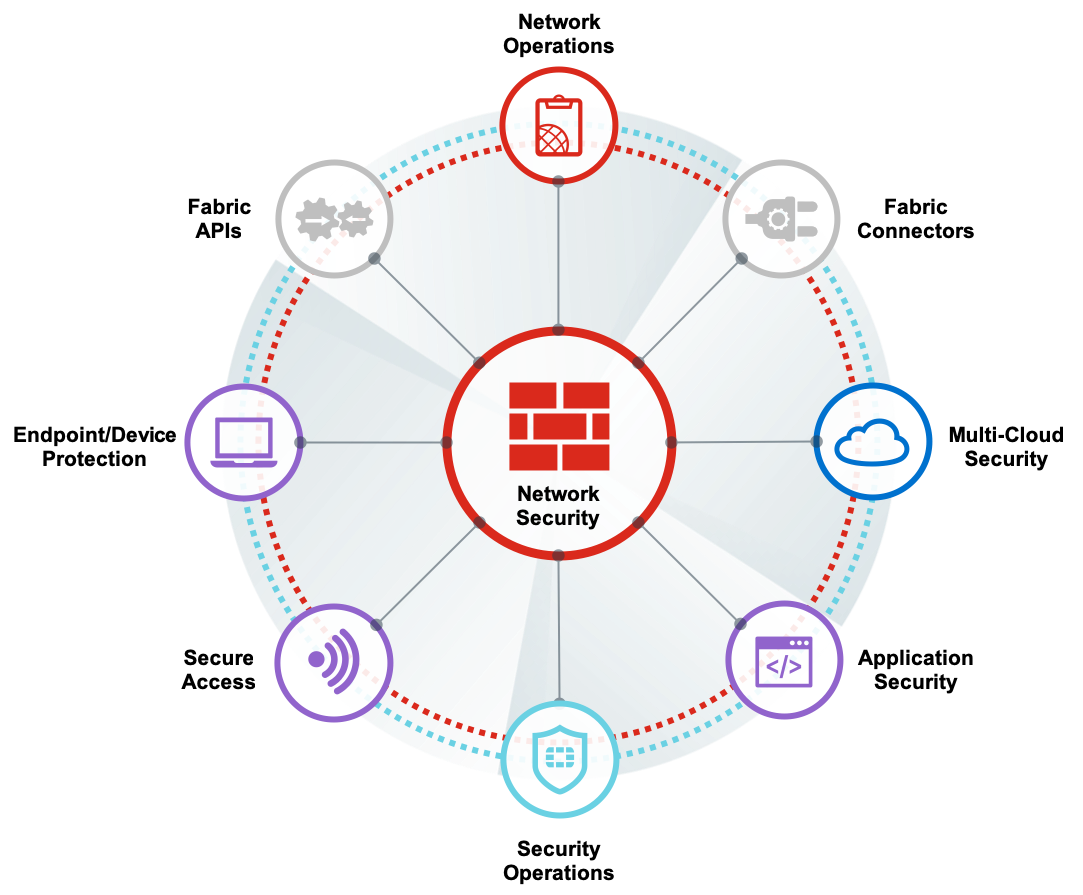
Fortinet’s FortiGate Network Security & Firewall Support
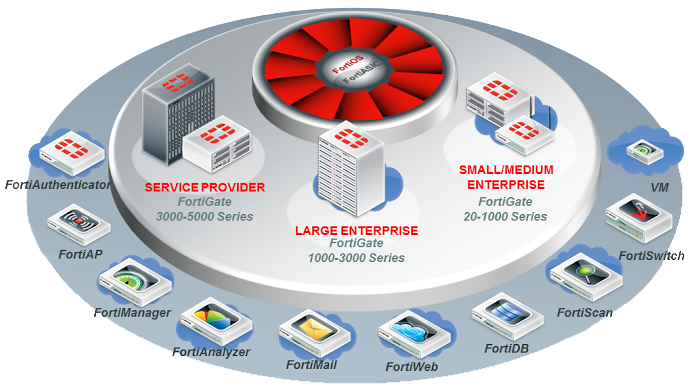
Fortinet Support